- Pricing & Availability
- What comes in the box?
- Design & Construction
- Size & Measurements
- User Interface
- Emitter & Beam
- Mode Chart
- Runtime
- Driver & Regulation
- Batteries & Charging
- Switch
- Carry & Ergonomics
- Competition
- Conclusion
Pricing & Availability
Wuben sent me this light in exchange for an honest review. Here’s a link to the Kickstarter campaign. That’s a tracked link so they know I sent you, but I’ve chosen not to earn any commission through sales generated by that link. I don’t know the MSRP at the time of writing, but the Kickstarter early bird price is $120 USD, so we can assume MSRP will be more than that.
What comes in the box?
I believe my sample came in a pre-production box, so the normal retail version will likely be different. Inside is:
- The light itself
- Batteries (inside the light)
- Quick detach bike mount
- User manual (not pictured)

Design & Construction
X1 Pro’s design is futuristic and striking. It’s a brick with lots of interesting chamfers and facets.


Build quality is good. It feels solid and well made, but it doesn’t “wow” me. One complaint is that some of the panels don’t line up perfectly, as shown in the fourth photo of the first slideshow. I would have expected more precision at this price point.
It’s IP65 rated, not the more common IP67/IP68 rating found on most competitors, presumably because it has an active cooling fan. That fan is ostensibly removable and user-serviceable, but it requires an odd-size tiny hex driver bit between the 1.3 and 0.9 sizes in my iFixit Mako set.
Size & Measurements
Mini Maglite | Olight Marauder Mini 2 | Wuben X1 Pro | Nitecore EDC37 | Olight Warrior 3S

Wuben X1 | Wuben X1 Pro

| Measurement | Measured (mm) |
|---|---|
| Bezel Width | 57.4 |
| Thickness | 28.2 |
| Length | 138.5 |
| Body Width | 27.1 |
| Switch Diameter | 11 |
| LED Footprint | 5050 |
| Included Battery Length | 74.6 |
| Weight with included battery (g) | 284 |
User Interface
This is a largely industry-standard UI and it works well. I’m glad the channel selection is on a separate switch instead of shoehorned into this UI on a single switch.
Basic E-switch UI Checklist: 10/12
- 1C on/off✅
- 1H to change brightness✅
- Stepped levels✅
- Main rotation is Low-Med-High❌
- Eco is also in the main rotation. It shouldn’t be, because it has a dedicated shortcut.
- Lowest-mode shortcut: 1H from off✅
- Low shortcut: 1H from lowest mode✅
- Turbo shortcut: 2C from anywhere✅
- Strobe shortcut: 3C from anywhere✅
- Mode memory for Low, Medium, and High✅
- No mode memory for lowest mode, Turbo, and Strobe❌
- Eco (lowest mode) is memorized
- 4C or separate switch to lock/unlock✅
- Does something when you click the switch in Lockout mode✅
Notes:
- 3C from Strobe activates SOS mode.
- 5C turns the fan on/off manually, even when the light is off.
Emitter & Beam
X1 Pro uses four Cree XHP50.3-HD LEDs in a quad reflector for the flood channel, and a single Cree XHP50.3-HI in a deeper single reflector for throw. The four flood LEDs do a great job for flood, but I think the throw LED and reflector selection is poor. I wish Wuben had used a high-intensity single-round-die LED here and a smooth, deeper reflector for a narrower, punchier beam. The bezel is easily removable with a 1.5mm hex driver, so emitter swaps should be about as easy as they were on the first generation.


The flood beam has a bright, wide hotspot with bright, wider spill. There are some artifacts at the edge of the spill from the quad reflector and some tint-shift, but you don’t notice those things in use. It does a great job flooding an area with as much light as possible.
The “throw” beam is wholly unimpressive. It’s a balanced beam shape, not a throw/spot beam shape. It doesn’t significantly out-throw the flood beam. A much narrower, punchier beam would have been more effective and more impressive.
In the beamshots below, camera settings are fixed and the wall is 2.8M away.


In the beamshots below, camera settings are as similar as possible, the basketball goal to the right of the hotspot is 39M away, and the power pole in the center is 185M away.


Mode Chart
Disclaimer: All of my measurements are taken at turn-on. Lumen measurements were taken on a Texas Ace 3.5″ Lumen Tube. A candela measurement was taken at 10 meters with an Opple Light Master III on the highest brightness, and other candela figures were calculated relative to that. CRI, CCT, & DUV data were taken for each mode from a few feet away at the center of the hotspot with the Opple Light Master and Waveform DUV Calculator. Runtime tests were performed with the Ceilingbounce app on my smartphone. These tests were performed with a fully charged included battery unless otherwise specified. I cannot measure moonlight directly, so moonlight readings are calculated based on the brightness relative to the next-lowest mode. None of this is professional equipment, so take these measurements with a grain of salt.

The official specs are above, followed by my own measurements below. It falls significantly short of the advertised lumen figures, but it does meet and slightly exceed the advertised throw.
| Level | Lumens | Candela | Throw (Meters) | CRI (Ra) | Color Temp. (K) | DUV (Tint) |
| Turbo | 7700 | 15000 | 250 | 71 | 6560 | 0.0011 |
| High | 1500 | 2900 | 110 | 70 | 6200 | 0.0036 |
| Medium | 430 | 830 | 58 | 70 | 6100 | 0.0044 |
| Low | 170 | 330 | 37 | 70 | 6080 | 0.0049 |
| Eco | 7 | 15 | 08 | 70 | 6010 | 0.0049 |
| Level | Lumens | Candela | Throw (Meters) | CRI (Ra) | Color Temp. (K) | DUV (Tint) |
| Turbo | 9000 | 38000 | 390 | 71 | 6600 | 0.0028 |
| High | 2200 | 9300 | 190 | 71 | 6570 | 0.0035 |
| Medium | 720 | 3100 | 110 | 69 | 6270 | 0.0057 |
| Low | 300 | 1300 | 71 | 69 | 6230 | 0.0057 |
| Eco | 15 | 64 | 16 | 65 | 5670 | 0.0096 |
| Level | Lumens | Candela | Throw (Meters) | CRI (Ra) | Color Temp. (K) | DUV (Tint) |
| Turbo | 2500 | 26000 | 320 | 69 | 6390 | 0.0053 |
| High | 1000 | 10500 | 210 | 70 | 6460 | 0.0048 |
| Medium | 410 | 4200 | 130 | 69 | 6190 | 0.0067 |
| Low | 170 | 1800 | 84 | 68 | 5940 | 0.0079 |
| Eco | 6 | 66 | 16 | 69 | 6070 | 0.0070 |
Runtime


Performance: Initial Turbo brightness is impressive but it steps down quickly. Sustained output is impressive at nearly 3000 lumens, but you have to be using the flood+throw channel to achieve that. The Throw and Turbo channels only sustain ~1000 to ~1600lm, which is lower than I would expect. I’m glad to see that runtimes are nice and flat between thermal stepdown and low battery.
Thermal regulation: I didn’t do a separate “cooled” test because this light has an active cooling fan built in. It turns on automatically when the light is hot, and turns off when the light is not. You can also manually turn it on/off with 5 clicks, even if the light is off. I don’t believe there’s any active adjustment of the brightness based on temperature, because the runtimes are flat and Turbo steps down at 30 seconds regardless of the selected channel.
LVP (Low Voltage Protection) is present and works well. It doesn’t rely on the battery having a protection circuit. The light will shut off when the battery is practically empty, but it can be temporarily re-activated in an emergency.
Driver & Regulation
The driver must be a Buck circuit, because I measured just over 5V at the MCPCB on Low mode, while the fully charged batteries make 8.4V total. That’s great news because Buck drivers tend to be efficient and provide good regulation.


Regulation performance is below average. Maximum achievable Turbo brightness drops noticeably as the battery drains. I expected better for the price, and I wonder if some aftermarket high-discharge batteries would help.
PWM: No Opple found varying degrees of flickering at most brightness and channel combinations aside from Flood High and Flood Turbo. My phone camera could pick it up most of the time too. Nothing visible to my eyes nor audible to my ears though.
Parasitic Drain: 36 microamps. That will take ~15 years to drain the included batteries.
Batteries & Charging


The batteries included are Wuben-branded, button-topped, protected, 4800mAh, 21700 cells that work well. The batteries are easily user-accessible through a latch and door on the tailcap, and there’s a third contact for balancing this time. Those are huge improvements over the original X1. There is physical reverse-polarity-protection so you must use button-top batteries.

Charging is facilitated by a USB-C port on the side near the button. The port is sealed by a silicone flap, which feels a bit out of place on such a fancy-looking aluminum block of a flashlight. As you can see written on the side of the light, it accepts up to 30W PD input for fast charging in 2 hours (according to the manual). Unfortunately, I don’t have a charger that powerful so I couldn’t test the charging speed claim. It also provides 5V 3A powerbank output. It works while charging, but only in Eco or Low modes and with the batteries inserted.
The battery indicator is a small LED in the center of the switch. I prefer indicators with four discrete LEDs, but this single-LED system works OK. Here’s what it means:
| State | Color | Meaning |
| Charging | Blue | Full |
| Charging | Red | Charging |
| Unplugged | Blue | >80% |
| Unplugged | Blue Blinking | 50-80% |
| Unplugged | Red | 20-50% |
| Unplugged | Red Blinking | <20% |
Switch

X1 Pro has two switches, a main power switch on the side and a channel selector on the face. The main switch is an E-switch with a metal boot. I like its placement on the side of the light. That’s more ergonomic than being placed on the face like the original X1. It’s not especially tactile or audible, but it does the trick. There’s a battery indicator LED in the center.
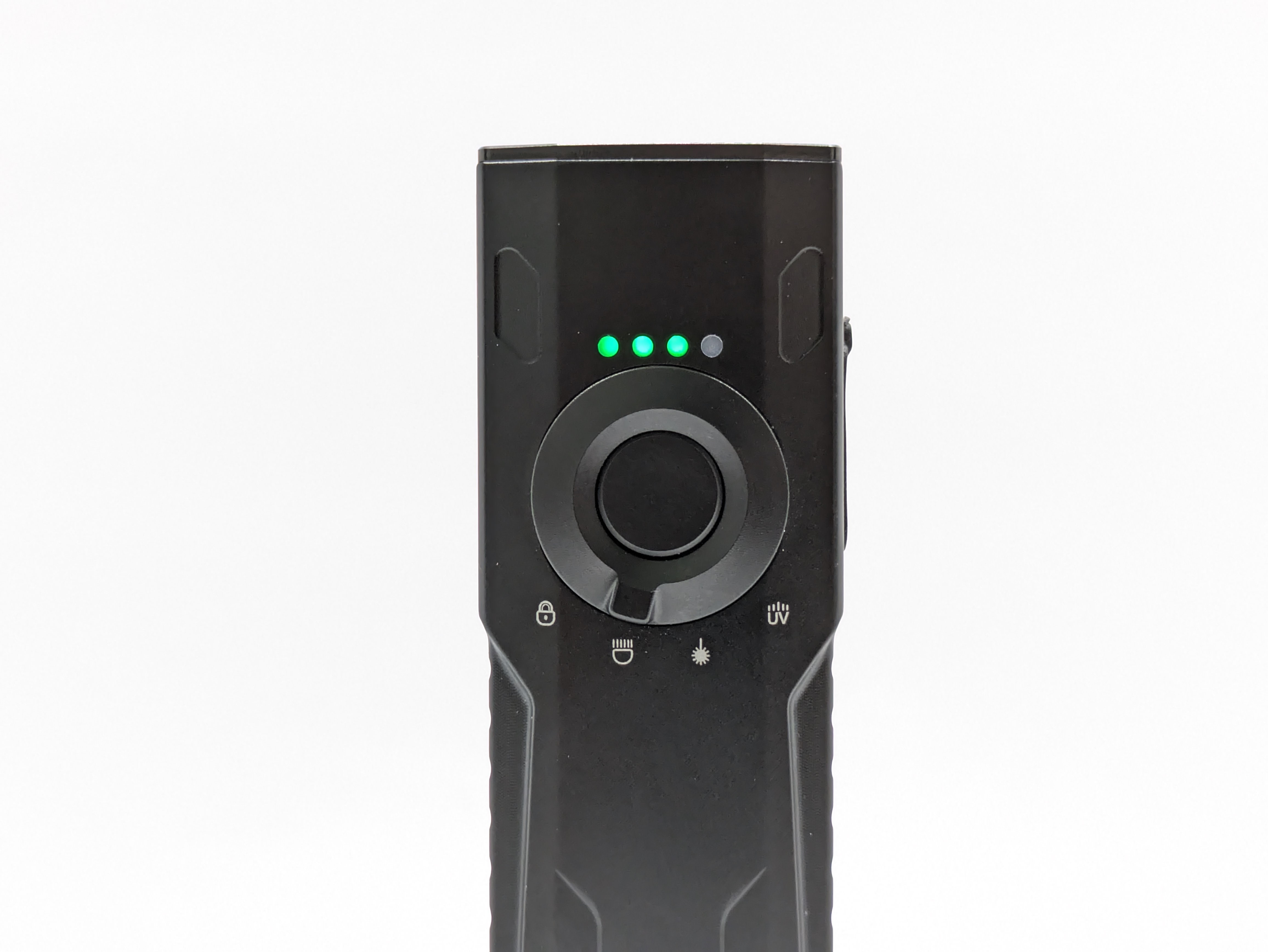
I’m glad there’s a dedicated channel selector switch. That’s much more intuitive than adding more clicks and holds to the main switch UI. The selector is tactile with great detents and is easy to find in the dark. My only significant complaint is that the switches are on separate faces.
Carry & Ergonomics
Ergonomics are good, but could be better. The switches being on separate faces means I can’t always comfortably reach both switches. It’s not bad with my left hand, but it’s impossible with my right. I wish the channel selector were on the side with the main switch. Aside from that, the ergonomics are great and I really like the feel in hand.


Magnet: There is no magnet in the tailcap. That would have been nice to have.
Competition
Here are some lights in the same class and how they compare.
Olight Marauder Mini 2: cylindrical alternative
- more expensive
- MUCH more impressive spot beam, it’s not even close
- similar peak brightness
- four channels (floodlight, spotlight, red, and a small side light)
- worse and excessive switches
- takes up a lot more space in your bag or jacket pocket
- oncludes a hard carrying case
- user replaceable proprietary battery
- USB-C and proprietary magnetic charging options
- USB-C charging cable lanyard included
- no bike mount
Nitecore EDC37: compact alternative
- a personal favorite of mine. This is the light I grab when I want something BRIGHT.
- a bit less expensive
- lower peak brightness, throws further
- significantly smaller
- uses two built-in 18650 batteries (not user replaceable)
- has a pocket clip
- dual tail switches
- uses multi-die LEDs for flood/throw function instead of separate reflectors
- doesn’t have a dedicated flood mode without the spot diodes
- fantastic physical lockout switch
- OLED status display
- gets hot fast and steps down more dramatically
- removable glass breakers
- no bike mount
Acebeam Terminator M2(X): another compact alternative
- similar price
- single, user-replaceable, 18650 battery (much smaller than two 21700s)
- not nearly as bright flood beam, but has multiple LED options
- aspheric spot beam (throws further, no spill, not as bright)
- tailswitch and side switch
- has a pocket clip
- technically has an RGB function but it’s very dim
- no bike mount
This section is not comprehensive. If I didn’t include a particular light here, it doesn’t mean it’s bad or doesn’t deserve to be here. I simply cannot list every possible competitor.
Conclusion
Overall, X1 Pro offers several significant improvements over the original X1 but it’s not a slam-dunk. I love the standard user-swappable batteries, fast USB-C charging, brightness, and dedicated channel selector switch. I like the UI, aesthetics, ergonomics, and powerbank function. The build quality and battery indicator are fine. The PWM may be an issue for some buyers. I dislike the unimpressive throw beam, over-promised brightness specs, switches being in different locations, and wish it had a magnetic tail.
Thanks to Wuben for sending me this light for review!