
Pricing & Availability
Hank from intl-outdoor.com sent me this light in exchange for an honest review. Here is the official product page where you can see current pricing. At the time of writing it’s $63 USD for this configuration and ships from China. Hank told me that my sample is pre-production, but the firmware is the only thing that may change for the production version.
What comes in the box?
My pre-production sample came in a typical Emisar/Noctigon cardboard box with a label stocker. Inside is:
- The light itself
- Spare o-rings
- Tailcap spacer (to be used instead of clip)
- Additional floody optic (optional)

Notably, a battery and charger are not included. Neither is a copy of the user manual, which you can find here.
Design & Construction
The design is similar to previous KR-series lights, but scaled up to fit a 21700 battery. It’s a sleek looking light and I love that the only branding is a subtle “Noctigon KR1K” on the tailcap.


Build quality is excellent. It feels solid and well made. There are no hard edges or blemishes. The deep blue anodizing on my sample is lovely and the threads are super smooth.
Size & Measurements
Surefire G2X Pro + Switchback | Zebralight SC65c Hi | Noctigon KR1K | Mini Maglite | Olight Warrior 3S

| Measurement | Measured (mm) |
|---|---|
| Head Diameter | 30.3 |
| Length | 110.8 |
| Switch Diameter | 16.3 |
| Lens Thickness | 1.5 |
| Lens Diameter | 27.8 |
| Optic Diameter | 26.2 |
| Optic Height | 13.7 |
| MCPCB Size | 22 |
| Body Tube Diameter | 25.0-27.4 |
| Tailcap Diameter | 28.6 |
| Tailcap Length | 19.6 |
| Weight with P42A battery (g) | 143 |
Switch & User Interface
KR1K has a tail e-switch like the rest of the KR series. This one feels a lot nicer than KR1/KR4 lights I’ve had in the past. The switch has a significantly firmer and more positive actuation, similar to Noctigon’s KR1AA switch. I carried it for a few days and didn’t have any accidental pocket activations in that time.

This light comes with an advanced, configurable firmware called Anduril 2. I’m not covering it in detail here but I’ll put it through the checklist. The default simple mode works fine, but I put it into advanced mode and made some configuration changes to suit my preferences. There are flashing pads accessible on the driver for firmware updates.
Basic E-switch UI Checklist: 11/12
- 1C on/off✅
- 1H to change brightness✅
- Stepped levels✅
- By default it’s smooth ramping, but you can set it to stepped.
- Main rotation is Low-Med-High✅
- This is configurable. By default it’s smooth ramping, but you can set it to have as few or as many modes as you like.
- Moonlight shortcut: 1H from off✅
- Low shortcut: 1H from Moonlight✅
- Turbo shortcut: 2C from anywhere✅
- Strobe shortcut: 3C from anywhere❌
- 3C activates the battery voltage readout mode. Strobe is 3H. I wish these were reversed to be more industry-standard.
- Mode memory for Low, Medium, and High✅
- This is configurable. By default it will memorize the last mode you used unless it’s accessed via shortcut. One cool thing you can do is called “manual mode memory” where you can set the light to always come on at a particular brightness, regardless of the last mode used.
- No mode memory for Moonlight, Turbo, and Strobe✅
- If you access these via shortcut they will not be memorized. If you access it by ramping to that level, it will be memorized.
- 4C or separate switch to lock/unlock✅
- Does something when you click the switch in Lockout mode✅
- Momentary moonlight. Handy! It’s worth noting that mechanical lockout (loosening the tailcap) works great here too.
Emitter & Beam
My sample has a Luminus SFT70 LED in 5000K. It can get quite bright but it gets hot quickly at higher levels and it doesn’t have great color properties. It has some brightness-induced tint shift, being a bit warmer and greener at lower levels and cooler and less green at higher levels. Several variants of the Noctigon NTG50 and Cree XHP70.3 LEDs are also available.


There are a couple of optic options. Here’s a beam comparison between the standard and floody optics:


I prefer the stock optic for its balanced beam profile; not too floody, not too throwy. Its hotspot and spill are soft with no defined edges. The floody optic has a much wider hotspot that’s a little more defined, but still soft.
In the beamshots below, camera settings are fixed and the wall is 2.8M away.


In the beamshots below, camera settings are as similar as possible, the basketball goal to the right of the hotspot is 39M away, and the power pole in the center is 185M away.


Auxiliary LEDs
KR1K is equipped with six RGB auxiliary LEDs that sit below the front optic. They look stunning. I particularly like the “white” color option because it makes the optic look like a prism separating the white light into a rainbow of hues. They’re quite bright on high mode and can easily be used as a moonlight mode. Switching to the optional floody optic makes the aux LEDs pop even more.
A new feature of these particular aux LEDs is a smooth color transition option. Previously if you set the aux color to rainbow, they would cycle among six different distinct colors. KR1K has the ability to continuously fade between colors. The slight flickering in the video above is just visible in the video, not to the naked eye.

The floody optic (shown above) makes the aux LEDs even better.
Mode Chart
Disclaimer: All of my measurements are taken at turn-on. Lumen measurements were taken on a Texas Ace 3.5″ Lumen Tube. A candela measurement was taken at 10 meters with an Opple Light Master III on the highest brightness, and other candela figures were calculated relative to that. CRI, CCT, & DUV data were taken for each mode from a few feet away at the center of the hotspot with the Opple Light Master and Waveform DUV Calculator. Runtime tests were performed with the Ceilingbounce app on my smartphone. These tests were performed with a fully charged included battery unless otherwise specified. I cannot measure moonlight directly, so moonlight readings are calculated based on the brightness relative to the next-lowest mode. None of this is professional equipment, so take these measurements with a grain of salt.

The official specs are above, followed by my own measurements below.
| Level | Lumens | Candela | Throw (Meters) | CRI (Ra) | Color Temp. (K) | DUV (Tint) |
| Turbo (150) | 2400 | 41000 | 410 | 67 | 5460 | 0.0045 |
| High (113) | 1200 | 21000 | 290 | 64 | 4800 | 0.0065 |
| Medium (75) | 310 | 5300 | 150 | 64 | 4600 | 0.0084 |
| Low (38) | 18 | 310 | 35 | 62 | 4590 | 0.0108 |
Moonlight isn’t on the above chart because it’s wildly dim. At level 1 I can barely see it even in a pitch black room when looking directly at the light. As impressive as that is, I’m glad you can raise the ramp floor up into the level 5-10 range to get a more useful Moonlight mode.
Runtime

Performance: Turbo time is poor, with stepdown starting immediately. That could be because mine has pre-production firmware. Sustained output is a bit below average for this class (single 21700) in the 5-600lm range, but the light stays cool enough to pick up and hold. Many competitors that sustain closer to 1000 lumens get too hot to actually hold and use.
Thermal Management: My Turbo Cooled test shows a significant increase in sustained brightness, meaning this light has active thermal throttling that will adjust brightness to give you maximum performance without overheating. I am surprised to see that the Turbo Time is not affected by active cooling.
LVP (Low Voltage Protection) is present and works well. It doesn’t rely on the battery having a protection circuit. The light will dim and eventually shut off when the battery is practically empty, but it can be temporarily re-activated in an emergency.
Driver

The driver is a Lume X1 boost driver to provide great regulation, efficiency, and incredible moonlight performance. Flashing pads are accessible for firmware updates too.

Voltage immunity is good/average. It maintains full Turbo brightness down to ~25% charge, and all the other modes are flat down to 25% charge or less. That’s exactly what I want because it shows the components are high quality and they’re being pushed hard for great performance.
PWM: No PWM is visible to my eyes or camera, nor audible to my ears.
| Aux LED Brightness | Color | Measured Drain | Time to drain typical full 5000mAh 21700 battery |
| Off | 30 μA | 15+ years |
| Low | Constant RGB Voltage Display (blue) | 220 μA | 2.6 years |
| Low | White | 400 μA | 1.4 years |
| Low | Smooth RGB | ~1 mA | 208 days |
| High | White | 17 mA | 12 days |
| High | Smooth RGB | ~7 mA | ~30 days |
Batteries & Charging
KR1K requires an unprotected flat top 21700 cell (not included). I used a Molicel P42A for all my testing.

Charging: No charging solution is included, and batteries with a USB port built in won’t fit. You’ll need a separate bay-style charger.
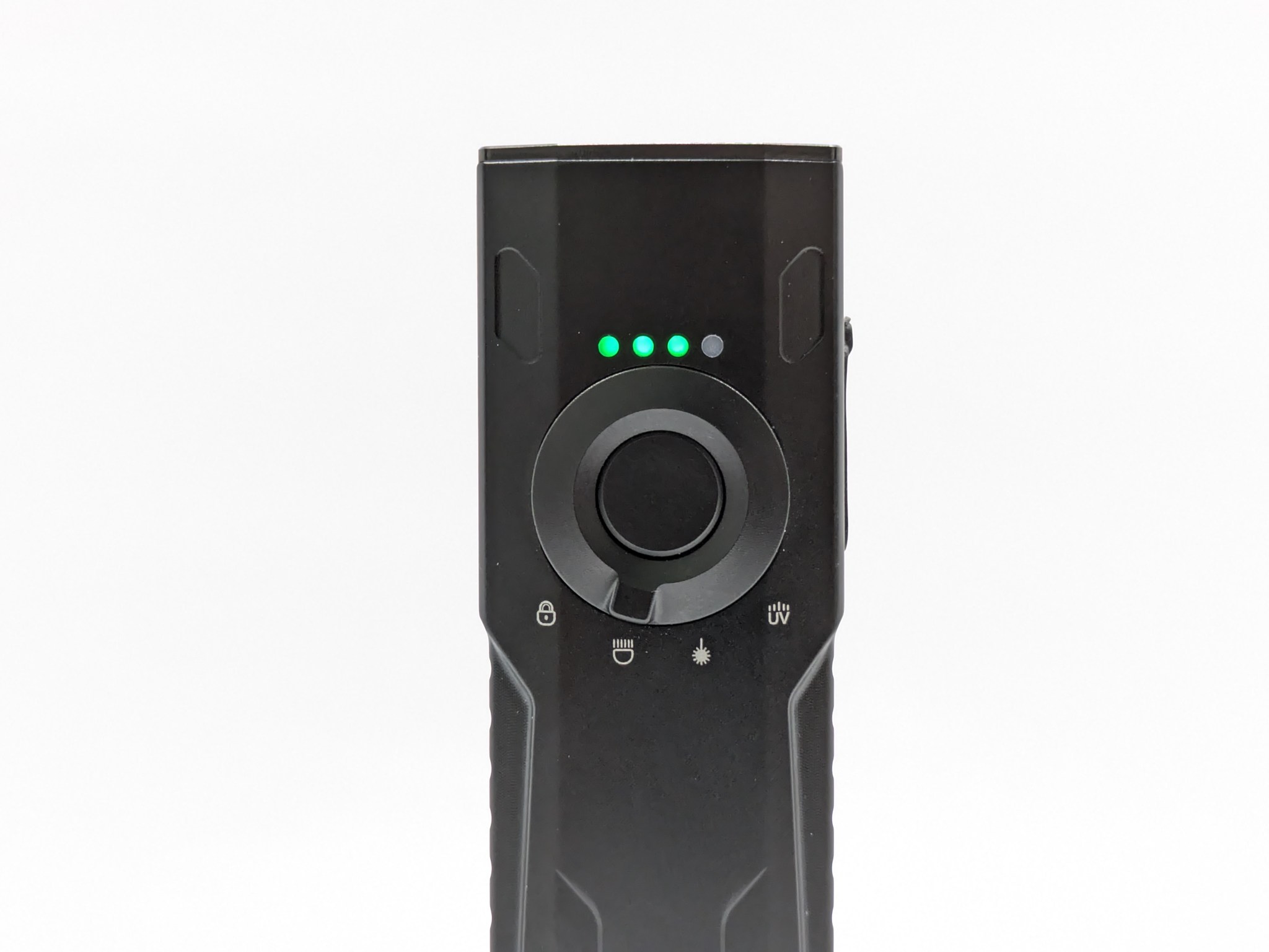
The battery indicators: I prefer four-diode indicators, which this light doesn’t have. It has two less-intuitive methods that are more granular and suited for enthusiasts.
- Voltage readout: Clicking 3x from off will cause the light to blink out the battery voltage. For example, three blinks, a pause, six blinks, another pause, and eight blinks means 3.68 volts.
- Aux color: The RGB aux LEDs can show battery charge level based on color. They can either do that constantly, or just for a few seconds after you turn off the light.
Carry & Ergonomics


Ergonomics are excellent. It feels great in the hand and it’s comfortable in reverse and cigar grips. A forward grip is comfortable too if you can use your other hand to press the switch. The texturing and finish isn’t especially grippy, so I wouldn’t plan to use this as a work light in wet conditions. It’s fine for normal use though.

Clip score: 7/7 – Perfect
- Attachment doesn’t pop off or rotate accidentally✅
- Can be removed and bent back into shape if needed✅
- Bezel-down carry is at a reasonable depth✅
- Landing location is smooth, not on the charging port, and away from the bezel✅
- Mouth/ramp and loop(s) are wide enough for pants material✅
- Finish is durable✅
- No bidirectional clips without reason✅
Notes:
- Carryability: I was surprised how unobtrusive this light is in the pocket. I’m used to carrying a much smaller and lighter Zebralight SC65c HI, but I didn’t find KR1K overly heavy or bulky to carry.
- Clip vs No Clip: If you don’t want to use the clip, a spacer ring is included in the box to replace the clip between the body tube and tailcap. It does not have a hole for a lanyard.
- Magnet: My sample does not have a magnetic tailcap, but it will be an option.
Competition
Here are some lights in the same class and how they compare.
Emisar DA1K: side switch alternative
- similar price and performance
- side switch instead of tail switch
- not as elegant and pocketable
- somewhat worse clip
- aux LEDs behind the button in addition to the optic
- same LED and optic options
- no battery nor charger included
- ships from China unless you order from jlhawaii808 and pay a markup
FireFlyLite X1S: integrated charging alternative
- more expensive
- only FFL LED options
- not as sleek or pocketable
- a bit larger, particularly the head and optic
- worse clip
- integrated USB-C charging
- battery optionally included
- side switch instead of tail switch
- retains RGB aux LEDs and magnetic tailcap
Skilhunt M300 V4: less-complex alternative
- a bit more expensive but the battery and charger are included
- similar performance
- side switch with simpler UI (no configuration)
- no aux LED’s
- proximity sensor (can be disabled)
- marginally worse clip
- not as sleek or cool looking
- simpler battery indicator
- magnetic tailcap
- stock available within the US
- orange peel reflector instead of TIR
This section is not comprehensive. If I didn’t include a particular light here, it doesn’t mean it’s bad or doesn’t deserve to be here. I simply cannot list every possible competitor.
Conclusion
This is a well designed multi-purpose light for enthusiasts. The aesthetics are fantastic, particularly the aux LEDs. The pricing, built quality, switch, voltage immunity, ergonomics, clip, throw, and LED options are great. The brightness and runtime are fine. Turbo time is poor. The UI is complex to configure but powerful.
Thanks to Noctigon for sending me this light for review!


Considering battery life – it’s highly advisable to charge battery up to maximum 4,05V (good chargers allow to set limits on voltage). Having this in mind driver inside this flashlight (Lume) is badly executed because it drops down lumens like crazy when battery (without load) achieves 3,2V. Lume detects 3,0V under load and throttles down power a lot – I don’t like it.
Batteries are cheap nowadays – I take few spare ones with me in the pocket and don’t ever “fully” charge them to 4,2V and I advise any flasholic to do the same. I own four flashlights with Lume X1 driver (D4SV2, KR4, KR1, D1K) and I am not pleased with “voltage immunity” at 3,2V.
I change batteries with spare fresh ones (4,05V) when no load voltage reaches 3,0V. I am not turboing any of my flashlights, I use 120/150 ceiling for max output because even chubby D4SV2 detects temperature limit quickly when set to 150/150 so I ommit Turbo completely. Those flashlights should have better cooling for reasonal Turbo mode (even at weight/ dimensional cost), otherwise Turbo it’s pure marketing gimmick.
Plastic TIR optics have poor performance compared to reflector design. On Carlco website transmission efficiency numbers for plastic TIR are given within range 79-90%, so at least 10% of lumens are being wasted from plastic alone and 21% in the worst case. When I mounted “floody” plastic optics to my D4SV2 … I immediately saw aux led brightness drop a lot.
Please tell Simon to design new bezel with aux on the outside for reflector equipped flashlights. Many people like pocket carry flashlights so those people preffer plastic optics with aux led underneath but not everyone is the same.